Dometic RV-C Gateway Installation Instructions (DMC32RR)
Dometic Climate Control / RV-C Gateway installation manual (part 3316945.000, Form 3316990.000, Rev. A, 3/18). Networks compatible single-zone CT thermostat AC controls, furnaces, and wall-controlled Fantastic vents so they can be operated from one location. Covers shroud/foam-cover access on Blizzard NXT, Brisk II, and Penguin II, 3-pin pigtail wiring to the AC control board, remote temperature sensor and roof-fan connections, foam-tape mounting, and DIP-switch zone assignment (one gateway per AC, up to four per RV). Not for heat-strip models. This page also includes a dual-AC In-Command field schematic. 11 pages.
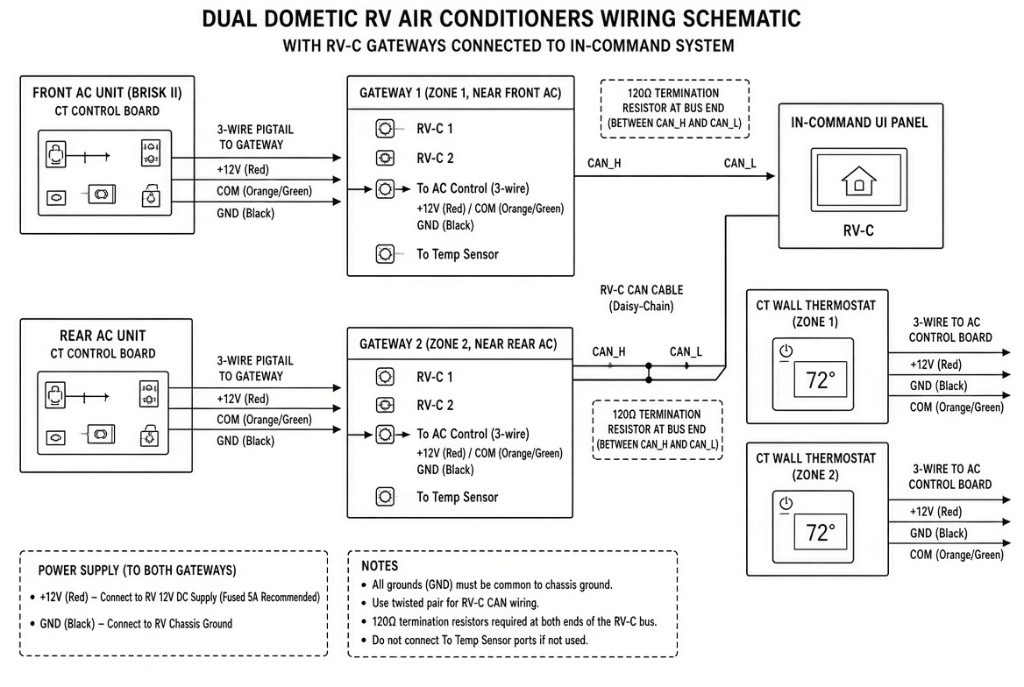
Dual AC with In-Command — field schematic
Simplified field-friendly topology for two Dometic ACs, two RV-C gateways, and an In-Command UI panel. Matches the architecture in the 3316945 installation manual (RV-C 1 / RV-C 2 ports and zone DIP switches) plus standard RV-C practice. Use the manufacturer PDF for official procedures.
Local connections (per AC)
- Each gateway connects to its own CT control board with the 3-wire pigtail: Red → +12 V to thermostat, Green/Orange → COM (communication), Black → GND.
- Each zone still has its own CT wall thermostat wired to its AC control board (same 3-wire set).
- Leave the To Temp Sensor ports disconnected if a remote sensor is not used.
Network (RV-C)
- Daisy-chain the two gateways on the RV-C bus: Gateway 1 RV-C 2 → Gateway 2 RV-C 1.
- Connect one end of the chain to the In-Command RV-C port.
- Place 120 Ω termination resistors at the two physical ends of the bus, between CAN_H and CAN_L.
- Use twisted pair for RV-C CAN wiring.
Power and zones
- Each gateway needs its own 12 V supply and ground, usually taken near that AC. Fuse the +12 V feed (5 A recommended).
- All grounds (GND) must be common to chassis ground.
- Set DIP switches so Gateway 1 = Zone 1 (front) and Gateway 2 = Zone 2 (rear).